
1985 – Xerox AI Mouse
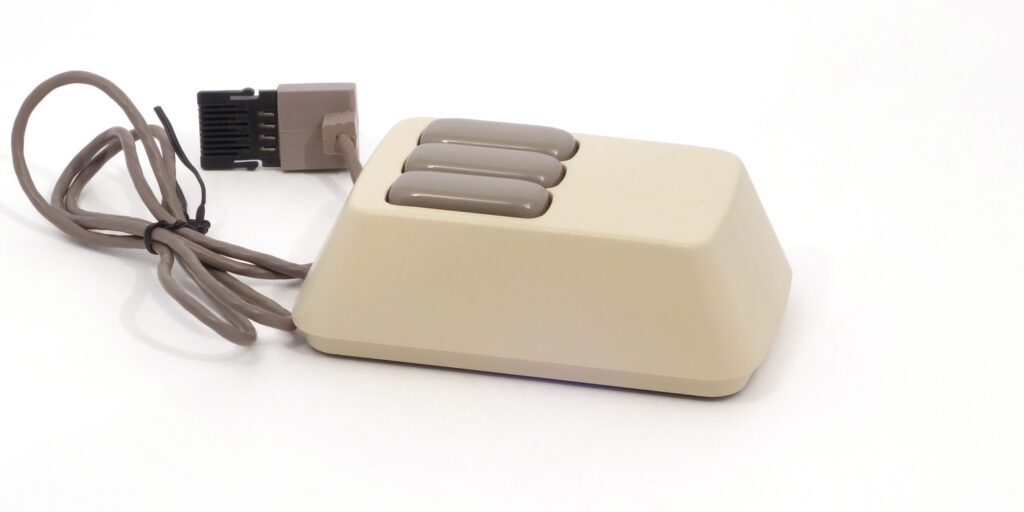
In 1985 Xerox released the last computer in the series of so-called D-machines – Daybreak (following the previous generations named Dorado, Dolphin, and Dandelion). The workstations were separately presented as office computers and as scientific ones. That was an already established tradition, because along with developing first GUI-based and mouse-driven office computer systems (Xerox Star), the company was actively experimenting with graphical development environment, resulting in the first ever window-based shell for a Smalltalk IDE, and also the Interlisp development environment for researchers in AI and exploratory development. These development systems used same hardware as Xerox Star, just under the different numbers: particularly, Daybreak machines were named the “6085 Professional Computer System workstation” when sold as office system, and “Xerox 1186 workstation” when configured as a Lisp machine[1]Xerox Daybreak: Wikipedia https://en.wikipedia.org/wiki/Xerox_Daybreak[2]History. The Medley Interlisp Project https://interlisp.org/history/[3]Lisp-based financial planning system out // COMPUTERWORLD, Vol. 19, Iss. 40, October 7, – P. 38 https://archive.org/details/computerworld1940unse_0/page/n40/mode/2up. The 1186 variant was targeted at supporting software research in AI, computational linguistics, graphical user interfaces, hypertext, and other research areas. And, specifically for it, Xerox developed a new mouse, referenced in its documentation as “AI mouse (three-button)”[4]Xerox 6085 PCS Service Manual. October 1988 https://www.bitsavers.org/pdf/xerox/6085/service/700P05710_6085_PCS_Service_Manual_Oct88.pdf P. 125.

The need in a special mouse was trivial: the Interlisp system used GUI controlled by three mouse buttons. Aside of other roles, the middle button was used to invoke pop-up menus for objects, including the Lisp objects manipulation in the Interlisp development environment[5]Bobrow D.G., Stefik M. The LOOPS Manual. – Xerox Corporation, December, 1983. – 124 p. https://xeroxparcarchive.computerhistory.org/indigo/loops/doc/manual/.CHAPLOOPS.PRESS!2.pdf, so having a physical third button on a mouse was considered important. But, starting from presenting Xerox Star Information System in 1981, Xerox had reduced the number of its mouse buttons to two, and therefore up to 1985 Xerox Lisp machines had to be equipped with third-party three-button mice: Xerox Alto mouse, Hawley Mouse House X063X Mark II mouse, or even Mouse Systems optical mouse[6]Xerox Star: Wikipedia https://en.wikipedia.org/wiki/Xerox_Star[7]Xerox Daybreak: Wikipedia https://en.wikipedia.org/wiki/Xerox_Daybreak. In the year 1985 Xerox finally closed this gap.
Exterior
The Xerox AI mouse is housed in the same case as its two-button Xerox Daybreak version, and is not very much different from the original optical mouse of Xerox Star. The upper part made of beige plastic is derived from a parallelepiped more or less. The topcase has shape identical to the mouse of Xerox Star: it widens toward the bottom, it’s front and back sides are convex and noticeably inclined, and vertical edges are rounded, substantially reducing the association with a “box”. On the upper side of the case there are three large, oblong buttons made of darker plastic: they meet at the edges, visually forming one solid block.
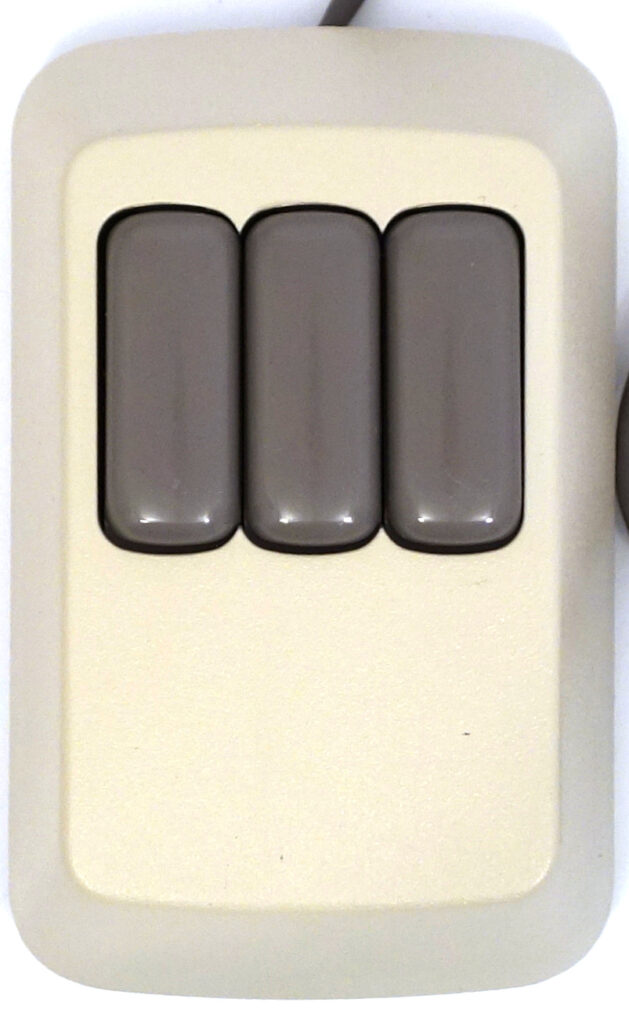

The bottom of the mouse is black, it features 3 plastic feet, the printed “made in” text, and a hole with lenses for the LEDs and the optical sensor. Mouse cable and jack housing are colored to match the buttons. The cable has no mechanical protection of it’s exit from the mouse body.
A 4x4 size scanning elements matrix is responsible for reading color inhomogeneities at move, so the mouse required either a pad with a specially designed pattern(an array of light hexagons on a dark field) or any surface with similar alternating light and dark spots, such as denim. The pad is easily reproducible by photocopying, and, more to say, the original Star mouse pad was a paper, sold in packs of 25 sheets[8]Alves P. Xerox 6085 workstation from 1985. Retro Microcomputers, Workstations, Servers and Consoles – Welcome! November 27, 2018. … Continue reading[9]R. F. Lyon The Optical Mouse: Early Biomimetic Embedded Vision / Advances in Embedded Computer Vision, Nov 2014, pp.3-22 … Continue reading. A reconstructed pad can be seen in figure below.


Size
The mouse could have been smaller and lower in size if it had not used the standard Xerox Star mouse body, developed for the uniformly looking mechanical and optical mice. As it is, Xerox Star mouse is rather small than medium, and visually it looks even smaller.

Ergonomics
In terms of ergonomics and appearance, the mouse is minimalist. The user experience of Xerox Star mice (including the AI one) is certainly less affected by the “rectangularity” of the case as it was with the previous Xerox Alto mouse. Convex oblong buttons, located within the reach of the fingers, are still good, and the inclined side of the case closest to the user even provides some comfort for palm – at least, more than a lot of mice of 1980s did (of course, lower body would make it even more comfortable).

Also, the small body width and its noticeable height, as far as small weight of the device, allow easily carrying the mouse to another part of the mouse pad by holding it with fingers on the sides. This could be handy when the mechanical unit get’s stuck for a while because of some piece of collected derbi – but not very much needed taking into account that the mouse is optical, and the A4 sheet of paper plays as a really large mouse pad.
Connectivity
Like all Xerox mice, Daybreak mouse has a quadrature interface[10]Xerox 6085 PCS Service Manual. October 1988, p. 177 https://www.bitsavers.org/pdf/xerox/6085/service/700P05710_6085_PCS_Service_Manual_Oct88.pdf. Following the original Xerox Star design, the mouse is connected to the computer via the Daybreak keyboard, which has a dedicated mouse socket on its back. But, differently from the previous generations of Xerox computers, instead of D-SUB 15 or 9 pin connector, it features a proprietary miniaturized jack. The socket on the keyboard PCB, though, shows that the difference is more cosmetic than functional: technically it’s still a 9-pin socket with the checkerboard pins order same as D-SUB[11]Xerox 6085 photos. 1186 Keyboard 110K00890 – bitsavers.org https://www.bitsavers.org/pdf/xerox/6085/photos/1186_Keyboard_110K00890/1186_KB_4.JPG[12]Xerox
Daybreak Mouse Converter https://github.com/fiowro/XeroxDaybreakMouseConverter/.

Internal design
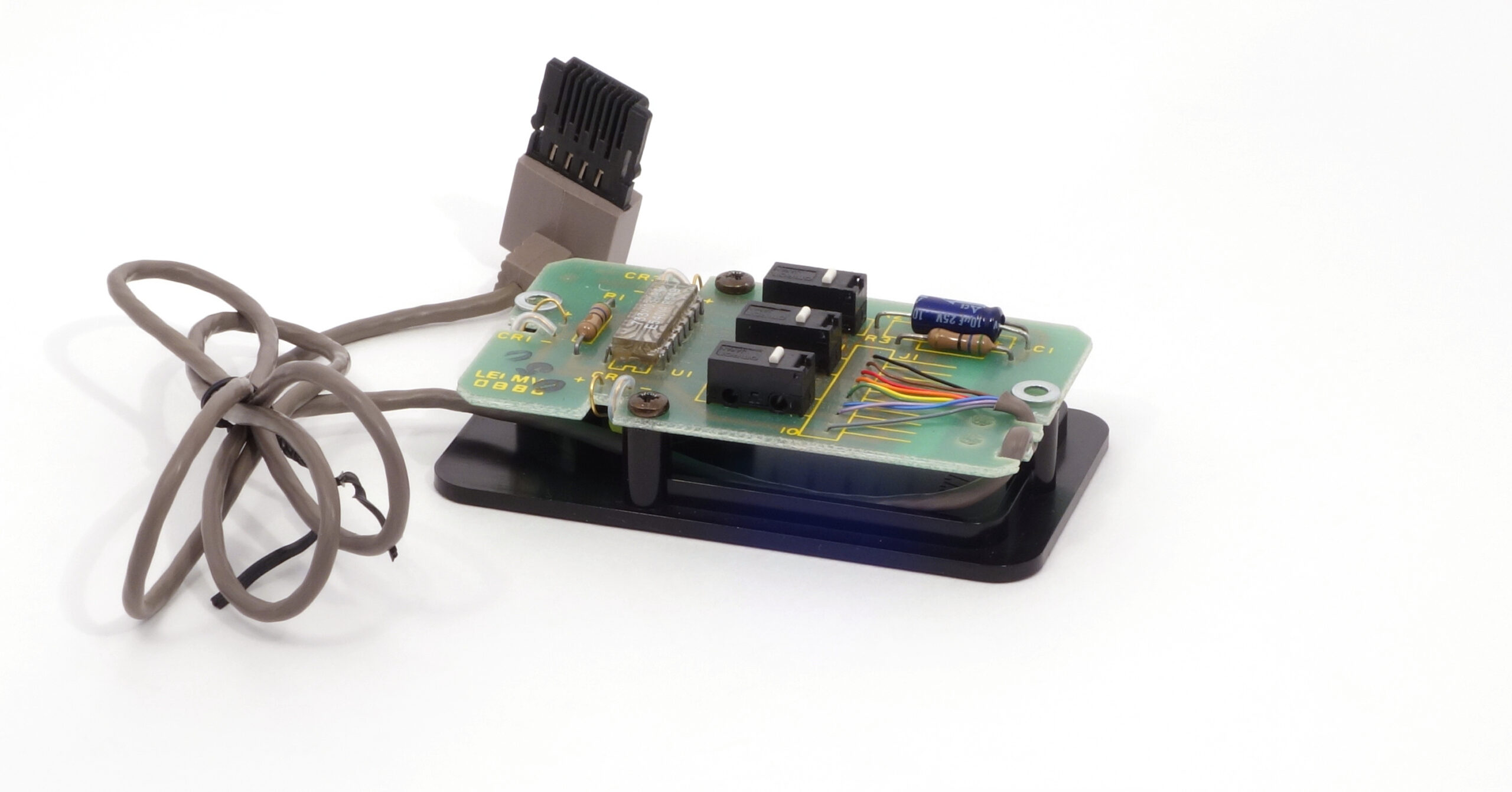
Mouse internals are shown below, where you can see the custom chip in a transparent injection-moulded plastic package[13]R. F. Lyon, M. P. Haeberli. Designing and Testing The Optical Mouse // VLSI DESIGN, January/February, 1982. – p. 20–30. https://www.dicklyon.com/tech/OMouse/DesigningTestingOMouse.pdf, which contains the scanning matrix, and also does some initial signal processing. The printed circuit board is raised above the base, and angle-directed LEDs placed under are illuminating the mouse pad.
References
| ↑1, ↑7 | Xerox Daybreak: Wikipedia https://en.wikipedia.org/wiki/Xerox_Daybreak |
|---|---|
| ↑2 | History. The Medley Interlisp Project https://interlisp.org/history/ |
| ↑3 | Lisp-based financial planning system out // COMPUTERWORLD, Vol. 19, Iss. 40, October 7, – P. 38 https://archive.org/details/computerworld1940unse_0/page/n40/mode/2up |
| ↑4 | Xerox 6085 PCS Service Manual. October 1988 https://www.bitsavers.org/pdf/xerox/6085/service/700P05710_6085_PCS_Service_Manual_Oct88.pdf P. 125 |
| ↑5 | Bobrow D.G., Stefik M. The LOOPS Manual. – Xerox Corporation, December, 1983. – 124 p. https://xeroxparcarchive.computerhistory.org/indigo/loops/doc/manual/.CHAPLOOPS.PRESS!2.pdf |
| ↑6 | Xerox Star: Wikipedia https://en.wikipedia.org/wiki/Xerox_Star |
| ↑8 | Alves P. Xerox 6085 workstation from 1985. Retro Microcomputers, Workstations, Servers and Consoles – Welcome! November 27, 2018. https://www.facebook.com/groups/retrocomputers/posts/2333452826684585/ |
| ↑9 | R. F. Lyon The Optical Mouse: Early Biomimetic Embedded Vision / Advances in Embedded Computer Vision, Nov 2014, pp.3-22 https://static.googleusercontent.com/media/research.google.com/ru//pubs/archive/43260.pdf |
| ↑10 | Xerox 6085 PCS Service Manual. October 1988, p. 177 https://www.bitsavers.org/pdf/xerox/6085/service/700P05710_6085_PCS_Service_Manual_Oct88.pdf |
| ↑11 | Xerox 6085 photos. 1186 Keyboard 110K00890 – bitsavers.org https://www.bitsavers.org/pdf/xerox/6085/photos/1186_Keyboard_110K00890/1186_KB_4.JPG |
| ↑12 | Xerox Daybreak Mouse Converter https://github.com/fiowro/XeroxDaybreakMouseConverter/ |
| ↑13 | R. F. Lyon, M. P. Haeberli. Designing and Testing The Optical Mouse // VLSI DESIGN, January/February, 1982. – p. 20–30. https://www.dicklyon.com/tech/OMouse/DesigningTestingOMouse.pdf |